



 114
114
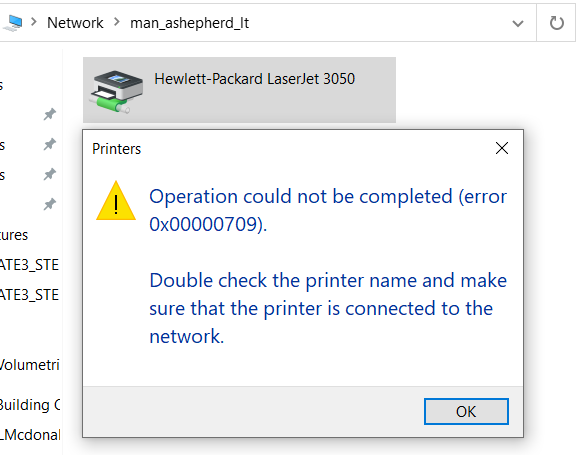
Got a problem where you can't connect to the USB printer and it looks something like this?
 \
\
The printer is on, you're connected to the computer with the printer and you're sure you have the drivers installed, but you still get this error message. The Issue is a legacy API called NetBIOS. You don't need to know what NetBIOS is, but it only allows a 15 character unique name to connect to other devices. Anything more than 15 characters and it won't recognize it, and you will get an error message similar to the one in the screenshot above. In the example screenshot below, the device we are connecting to has 16 characters in it. The extra "t" is preventing you from establishing a connection via NetBIOS.
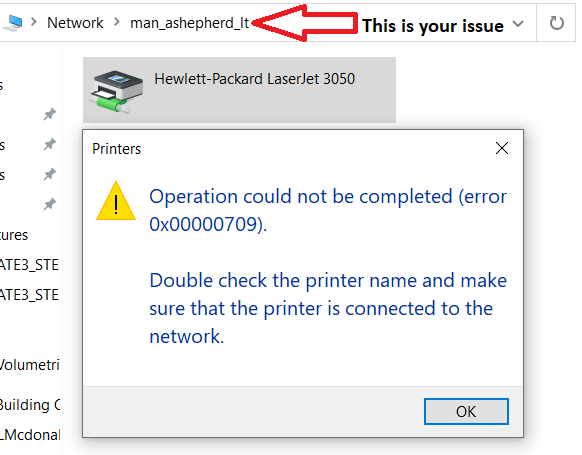
All you need to do is make sure any extra characters after the 15th one are removed, and you should be able to connect and use the printer on the other person's computer.
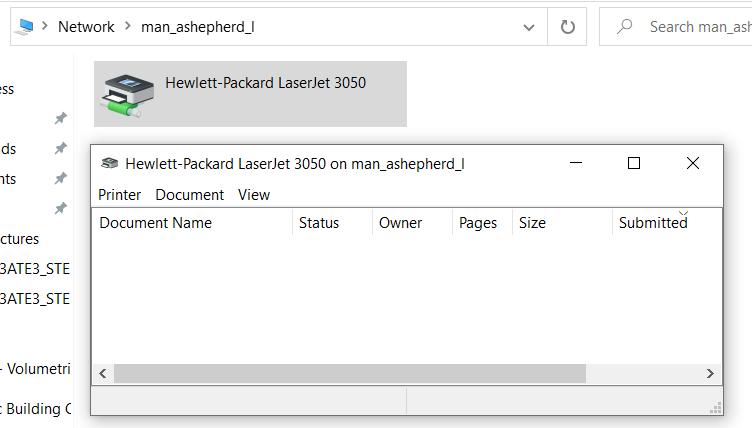
Questions or issues related to USB Printers? Feel free to contact your IT department.

